Keep what you read. As plain text.

SiteToMD turns a web page into a clean Markdown file: just the article, with its title, link and date on top. Try it here, or share straight from your phone.

Free, no account. Some script-heavy pages only work in the app.

Also on Android · iPhone soon

why-plain-text-wins.md

Sample · 1,842 chars

---
title: "Why plain text outlasts everything"
source: "https://example.com/plain-text"
date: "2026-09-30T08:14:00"
---

Why plain text outlasts everything

When you keep notes in a proprietary format, you're betting the company outlives your notes. Plain text files have outlasted every platform of the last thirty years. Your folder, your files.

A sample page. Paste a link above to clip your own.
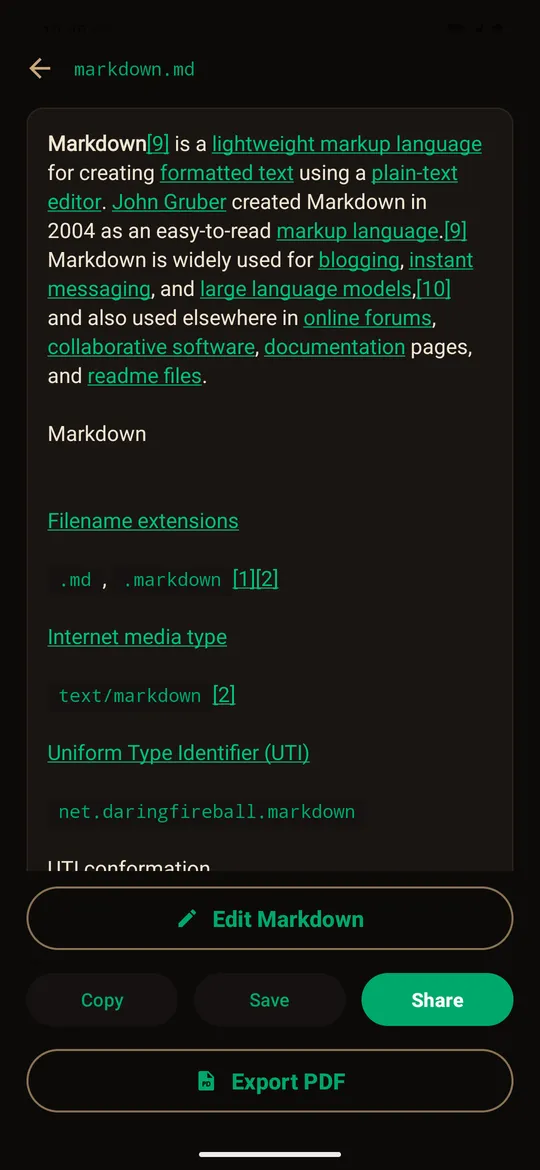
On your phone, it's one tap.

  1. Share from wherever you're reading

    In Chrome, Safari or a feed reader, tap Share and pick SiteToMD. You never copy a link.

  2. The page is cleaned on your phone

    The app opens the page in a private browser view and keeps only the article. Ads, menus and cookie banners are left behind, and nothing is sent to a server.

  3. A .md file lands in your folder

    Downloads/SiteToMD by default, or any folder you pick, like your Obsidian vault. Preview it, edit it, share it or export a PDF.

SiteToMD on Android showing a clipped article as formatted Markdown, with Edit, Save, Share and Export PDF buttons.
SiteToMD on Android

What ends up in the file

  • Front matter, filled in. Every file starts with title, source and date, so Obsidian, Logseq and iA Writer file it properly.
  • Just the article. Readability finds the text and Turndown writes the Markdown. Headings, lists, links and code blocks come through.
  • Where your data goes. In the apps, nowhere: pages are converted on your phone. On this website, a small function fetches the page so your browser can convert it. Details are in the privacy policy.
  • Free, no account. Android is on Google Play now. The iPhone app is waiting on Apple's review.